
How to add Apple CarPlay or Android Auto to an older car
You don’t need to buy a new car to enjoy modern smartphone connectivity. We explain how aftermarket Apple CarPlay and Android Auto systems work, what they cost and how to install one in your car.
Modern cars come with an ever-growing list of technology, but one of the most useful features is smartphone connectivity through Apple CarPlay or Android Auto. These systems allow drivers to access navigation, music, calls and other compatible phone apps through their car’s infotainment display.
If you’re driving an older car without these features, however, you don’t necessarily need to upgrade your vehicle to get them. Aftermarket systems can bring many of the same conveniences to cars built long before smartphone connectivity became commonplace.
From portable dashboard screens to replacement stereos that fit neatly into the existing dashboard, there are several options available, depending on your car and how much you want to spend.
What are Apple CarPlay and Android Auto?
Apple CarPlay and Android Auto allow you to connect your smartphone to a compatible car infotainment system, displaying a simplified selection of your phone’s apps on the dashboard screen. Apple CarPlay works with compatible iPhones, while Android Auto is designed for Android smartphones. Both offer broadly similar functions, including navigation through apps such as Google Maps and Waze, music and podcast streaming, hands-free calling and voice-controlled messaging.
Rather than relying on the car manufacturer’s own software, the system uses your phone to provide many of these functions. This means you can access familiar apps, saved destinations and music playlists without having to learn an entirely new infotainment interface.
Depending on the equipment, your phone connects through a USB cable or wirelessly. Wireless systems are more convenient, although wired connections can be more reliable and keep your phone charged during longer journeys. Neither platform allows you to use every app on your phone – only compatible applications and functions designed for in-car use are available.
What are the benefits of installing one?
For many drivers, the biggest advantage is access to modern navigation software. Instead of relying on an ageing built-in sat-nav system, you can use familiar mapping apps with regularly updated roads, traffic information and alternative routes.
Music and entertainment are another attraction. Compatible services such as Spotify, Apple Music and various podcast apps can be controlled through the car’s screen, while voice commands make it easier to select music or enter a destination without navigating multiple menus.
CarPlay and Android Auto can also provide a more familiar and responsive interface than the infotainment systems fitted to some older cars. For drivers who regularly change vehicles, the layout and available apps remain largely consistent.
There are potential safety benefits, too. Voice controls and simplified menus can reduce the need to handle your phone while driving, although interacting with any screen can still be distracting.
Upgrading the infotainment system could also make an older car more pleasant to live with for several more years. If you’re considering replacing an otherwise reliable vehicle primarily because its technology feels outdated, an aftermarket system may be a much cheaper alternative.
What types of aftermarket system are available?
There are three main ways to add Apple CarPlay or Android Auto to an older car. The best choice depends on your budget, the age and design of your vehicle, and whether you’re comfortable modifying its dashboard.
| System type | Approximate equipment cost | Main advantage |
|---|---|---|
| Portable dashboard screen | £60–£200 | Simple installation without replacing existing equipment |
| Replacement touchscreen stereo | £200–£600+ | Neater, more integrated installation |
| Factory-screen retrofit module | £200–£500+ | Retains the car’s original display and dashboard appearance |
These are approximate equipment prices, and professional installation or additional adapters will increase the total cost.
Replacement touchscreen stereos
A replacement stereo, sometimes called an aftermarket head unit, takes the place of your car’s existing radio or infotainment unit. These systems typically include a touchscreen display, smartphone connectivity, Bluetooth and, depending on the model, features such as DAB radio, reversing-camera support and upgraded audio controls.
For older cars with conventional stereo openings, particularly those designed around single-DIN or double-DIN units, installation can be relatively straightforward. A double-DIN opening is roughly twice the height of a traditional single-DIN radio slot, providing space for a larger display.
Some replacement systems use a screen that extends beyond the stereo opening, allowing a modern touchscreen to be fitted to a dashboard originally designed for a smaller radio.
The main attraction is a relatively tidy, integrated installation. Once fitted, the system can look much like an original part of the car, with fewer exposed cables than a portable alternative.
However, not every car is suitable. Vehicles with unusually shaped dashboards or infotainment systems that also control heating, parking sensors and other functions may require specialist equipment. In some cases, replacing the original system may be impractical or too expensive to justify.
Portable dashboard screens
Portable CarPlay and Android Auto screens are generally the simplest option, particularly for drivers who don’t want to remove or replace any existing equipment.
These standalone displays attach to the dashboard, windscreen or another suitable mounting point and usually draw power from the car’s 12-volt accessory socket or a suitable USB connection.
Once connected to your smartphone, they provide many of the same functions as a built-in system. Depending on the product and the car’s existing equipment, you can transmit audio to the car’s speakers through an auxiliary cable, Bluetooth or an FM transmitter.
Portable screens are generally much less expensive than integrated systems. They also don’t require any installation work and can be moved between vehicles, and removed when you leave the car to avoid theft. They’re particularly appealing for older cars with basic radios or unusual dashboard designs.
There are plenty of different units available, so it’s worth choosing one that fits comfortably into the space available in your car. For this article, we fitted a Carpodgo T4 and a Krunia RC04 to our editor’s Mazda MX-5, both of which are large enough to give a clear display but small enough to fit neatly into the MX-5’s relatively small cockpit. As the photos below show, the screen is powered through the car’s 12-volt socket and mounted using a CD-slot bracket (sold separately), positioning it in front of the car’s original infotainment display without any permanent modifications.
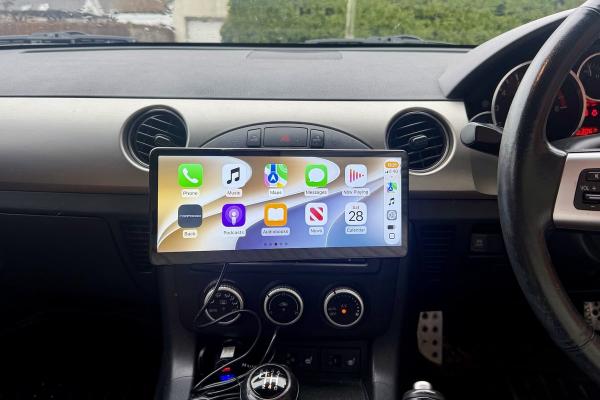
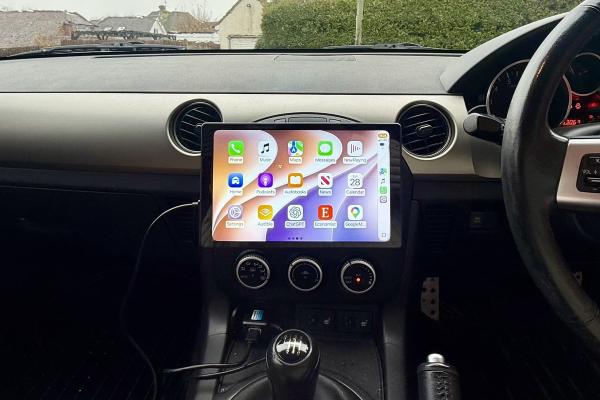
There are plenty of different displays available, so you should find something to fit your car and budget. Of the two above, we vastly prefer the Carpodgo T4. Although the screen is slimmer and therefore shows fewer icons than the Krunia’s taller display, the screen resolution was much higher, making text easier to read while driving, and the unit responded in a much snappier way. It also mounts via a simple magnetic plate, giving it a quick-release functionality when you park.
The main compromises with portable screens are practical. Power and audio cables can make the dashboard look untidy, while the screen itself takes up space and may obstruct visibility if positioned poorly.
Audio quality can also vary depending on the connection method. An auxiliary cable or suitable Bluetooth connection will generally be preferable to an FM transmitter, which may suffer from interference. It’s worth checking how a particular screen connects to your car’s existing audio system before buying.
Factory-screen retrofit modules
Some older cars already have a built-in infotainment screen but were manufactured before Apple CarPlay and Android Auto became widely available. For certain models, specialist retrofit modules can add smartphone connectivity to the existing display without replacing the entire system.
These modules typically connect behind the dashboard and allow the driver to switch between the original infotainment interface and the new smartphone functions. Depending on the vehicle, they may also retain existing steering-wheel controls, reversing cameras and other equipment.
The result can be particularly neat, preserving the original appearance of the interior while adding modern functionality. However, compatibility is highly vehicle-specific. A module designed for one generation of infotainment system may not work with another, even within the same car model.
Installation can also involve substantial dashboard dismantling and electrical work, so professional fitting is often the sensible option.
How much does it cost to add Apple CarPlay or Android Auto?
The price varies considerably depending on the type of equipment and how much installation work is required.
A basic portable screen can cost less than £100, although better-equipped models with larger displays, improved mounting systems and more reliable wireless connections can cost considerably more.
Replacement touchscreen stereos generally start at around £200 from established manufacturers, with more sophisticated units costing £500 or more. Factory-screen retrofit modules can fall into a similar price range, although vehicle-specific solutions may be more expensive.
For replacement stereos, you may also need a dashboard fascia, wiring adapters, an aerial adapter or equipment to retain the original steering-wheel controls. These additional components can make a seemingly inexpensive upgrade considerably more costly.
It’s worth obtaining a complete fitting quotation before buying a system, rather than budgeting for the touchscreen alone.
Will an aftermarket system work in any car?
Not necessarily, although portable systems make smartphone connectivity possible in a much wider range of vehicles. A replacement stereo needs to fit the available dashboard space, connect to the car’s electrical system and work with any original equipment you want to retain.
Some vehicles use standard stereo dimensions, making them relatively easy to upgrade. Others have bespoke infotainment units integrated into the dashboard, which can make replacement difficult or impractical.
Before ordering, check the exact make, model and year of your car, along with the specification of its existing stereo. Two cars of the same age and model may have different infotainment equipment depending on their trim level.
You should also consider whether you want to retain steering-wheel audio controls, the factory reversing camera, parking sensor displays or other features.
Phone compatibility matters, too. Some aftermarket systems support both Apple CarPlay and Android Auto, while others support only one. Similarly, not every system offers wireless connectivity.
One common point of confusion concerns wireless adapters. Small USB adapters advertised as wireless CarPlay or Android Auto upgrades generally require the car to have an existing wired CarPlay or Android Auto connection. They convert that connection to wireless rather than adding the feature to a car that doesn’t already support it.
Can you install Apple CarPlay or Android Auto yourself?
That depends on the type of system you choose and how comfortable you are working with vehicle electronics.
Portable dashboard screens are generally straightforward. Most require you to secure the screen using its supplied mount, connect the power cable, pair your smartphone and configure the audio output. Make sure the screen is securely attached, doesn’t obstruct your view of the road or instrument cluster, and that cables don’t interfere with the car’s controls.
Installing a replacement stereo is more involved. The existing radio must be removed, the appropriate wiring connected and any dashboard trim or fascia fitted correctly.
Older cars with relatively simple electrical systems can be suitable for DIY installation, particularly where vehicle-specific wiring adapters are available. However, cutting into the original wiring is best avoided.
On newer or more complicated vehicles, professional installation is usually preferable. The original infotainment system may communicate with other electronic components, and an incorrectly fitted replacement could interfere with features such as parking sensors, reversing cameras or steering-wheel controls.
Factory-screen retrofit modules can be more complicated still, often requiring sections of the dashboard to be removed and additional wiring to be routed behind the existing display. Unless the supplier specifically offers a straightforward installation kit for your vehicle, it’s generally worth paying a specialist.
What should you check before buying?
Before spending money on an aftermarket system, it’s worth considering the following:
- Vehicle compatibility: Will the unit fit your car, and are any additional adapters required?
- Phone compatibility: Does it support Apple CarPlay, Android Auto or both?
- Wired or wireless: Do you need to connect your phone with a cable?
- Audio connection: How will the sound reach your car’s speakers?
- Original controls: Can you retain steering-wheel buttons, parking sensors and reversing cameras?
- Screen quality: Is the display bright enough for daylight use and responsive to touch?
- Installation: Can you fit it yourself, or will you need professional help?
- Warranty and updates: Does the manufacturer offer technical support and software updates?
- Total cost: Have you included fitting, adapters and any other necessary equipment?
For portable systems, pay particular attention to mounting arrangements. A secure mount and tidy cable routing are more important than simply choosing the largest screen available.
Where can you buy an aftermarket system?
There are plenty of aftermarket infotainment systems available online, but choosing a reputable manufacturer or retailer is particularly important when buying equipment that will become part of your car’s electrical system.
Most car stereo manufacturers offer replacement stereo systems with Apple CarPlay and/or Android Auto compatibility. Their products are generally supported by installation instructions, warranties and technical information.
Retailers such as Halfords and specialist car audio suppliers sell replacement stereos and installation accessories, while other companies offer vehicle-specific retrofit modules or portable dashboard screens.
It’s worth checking whether the retailer provides compatibility advice, installation support and a suitable returns policy before ordering. Be particularly cautious with inexpensive, unbranded touchscreen systems sold through online marketplaces, where software support, reliability and after-sales assistance can be inconsistent.
A product advertised as compatible with your car isn’t necessarily guaranteed to retain every original feature, so checking the details before buying can save a lot of trouble later.
Disclosure: Carpodgo supplied The Car Expert with a T4 unit for evaluation. This article contains an affiliate link, which means we may receive a commission if you purchase through it.
Read more:


Related posts





Latest Post


No Comments