
Dash cams: What you need to know
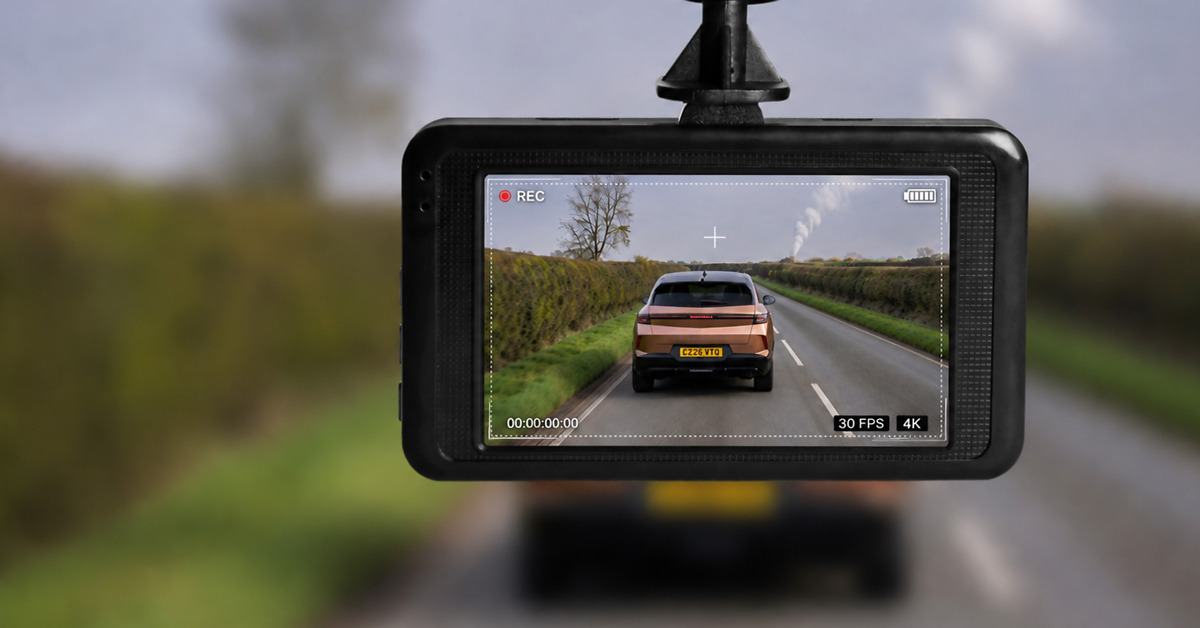
Dash cams have gone from being a relatively niche accessory to an increasingly common sight in British cars. The basic idea is straightforward: a small camera records what happens on the road ahead, providing a video record if you’re involved in a collision or witness something worth reporting.
But the technology has moved on considerably. Today’s dash cams can record in 4K, monitor the front and rear of your car, record while you’re parked, log your location using GPS and transfer footage straight to your phone. Some models can even upload recordings to the cloud.

That also means buying one isn’t quite as simple as choosing a camera and sticking it to the windscreen. There are different types of dash cam, a long list of features and specifications to decipher, and considerable differences in how well cameras actually capture important details such as number plates – particularly at night.
So, is a dash cam worth buying? What features should you pay for, and which can you live without? And what happens to the footage if you actually need it? Here are the essentials.
What is a dash cam and is one worth having?
A dash cam – short for dashboard camera – is a small video camera fitted inside your car, usually high up on the windscreen, that records the road as you drive.

Its main purpose is to provide evidence. If you’re involved in a collision where there’s disagreement over what happened, footage may show the positions of the vehicles, traffic lights, road markings and events leading up to the impact.
A dash cam may also capture a hit-and-run, attempted ‘crash for cash’ fraud, vandalism or dangerous driving.
But it’s not an infallible electronic witness. A camera only records what’s within its field of view, and darkness, glare, rain, dirty glass and moving vehicles can all make important details difficult to identify.
And remember that it records your driving, too. If the footage shows that you were speeding, distracted or partly responsible for an accident, having a camera isn’t necessarily going to help your case.
For many motorists, however, having an independent record of an incident makes a dash cam worthwhile – particularly as a decent camera doesn’t need to cost hundreds of pounds.
The Car Expert’s view: Don’t buy a dash cam expecting it to prove that you’re always in the right. Buy one because, if something happens, a video record is usually better than relying on two conflicting accounts.
Front, front-and-rear or three-channel?
A basic dash cam has one forward-facing camera. If your main concern is recording what happens on the road ahead, that’s probably all you need.
A front-and-rear system adds another camera looking through the rear window. It gives much better coverage and could provide crucial evidence if you’re hit from behind or an incident happens outside the front camera’s view.
It costs more and takes more effort to install, as a cable generally needs to run through the car to the rear camera. Recording two video streams also uses more memory-card space.
A three-channel system usually adds a camera covering the interior. These are particularly useful for taxi and private-hire drivers, but are probably unnecessary for most private motorists.
Check the specification before buying, as manufacturers don’t always use ‘three-channel’ to describe exactly the same camera arrangement.
Which should I buy? We’d consider a front camera the minimum and a front-and-rear system the sweet spot for most buyers. A cabin camera only makes sense if you have a particular reason to record what’s happening inside the car.
Most dash cams record onto a removable microSD memory card using loop recording. Once the card is full, the camera automatically overwrites its oldest recordings, so you don’t have to continually delete footage.
If the camera’s G-sensor detects an impact, it will usually protect the relevant recording from being overwritten. There’s normally a button for manually protecting a clip as well.
Many cameras also let you transfer footage to your phone over Wi-Fi, while some premium systems offer cloud storage or remote connectivity. These features vary considerably between manufacturers and may require additional hardware or a subscription.
Memory cards don’t last forever. A dash cam writes data almost continuously, so use a card recommended by the manufacturer – ideally a high-endurance model where appropriate – and periodically check that the camera is recording correctly.
Don’t forget the memory card: Check whether one is included with the camera and what capacity the camera supports. Higher-resolution and multi-camera systems generate much more data, so buying a tiny card for an expensive 4K camera is a ill-fitting choice.
Does it work when the car is off?
Not necessarily. A dash cam powered from a 12-volt socket or USB port will usually stop recording when you switch off the car, provided that socket also switches off with the ignition.
To monitor the car while you’re away, you’ll need a camera with a parking mode and a suitable power supply. This will commonly mean hardwiring the camera or using a dedicated dash-cam battery pack.
Some cars leave their 12-volt or USB sockets powered after you’ve parked, but running a camera continuously can drain the vehicle’s battery.
If parking protection is one of your main reasons for buying a dash cam, check how the particular model is powered before you buy it.
What is parking mode?
Parking mode lets a dash cam monitor your car after you’ve switched off the ignition.
The simplest systems save a recording when the camera’s G-sensor detects an impact. Others can detect movement around the vehicle, while buffered parking modes continually hold a few seconds of footage in temporary memory. If something triggers the camera, it can therefore save what happened immediately before the trigger as well as afterwards.
Some models also offer time-lapse or low-frame-rate recording for longer periods of monitoring.
The catch is power. Proper parking surveillance usually requires a hardwire kit or dedicated battery pack. A suitable hardwire installation should have low-voltage protection so the camera switches off before it excessively discharges the car’s battery.
Is hardwiring worth it? If you only want footage while driving, plugging the camera into a suitable 12V or USB socket is simpler. If parking protection matters to you, hardwiring is generally much more useful – and gives you a neater installation as a bonus.
What should you look for when buying one?
Resolution matters, but we don’t recommend choosing a camera simply because it has the biggest number on the box. Sensor and lens quality, video processing, exposure and HDR performance all affect whether you’ll actually be able to make out important details.
Good low-light performance is particularly valuable. Number plates can be surprisingly difficult for a camera to capture at night, especially when they’re moving or illuminated by headlights.
Also consider the field of view. A wider lens sees more of what’s happening around the car, but excessively wide footage can make distant objects appear smaller and introduce distortion.
Other useful features include GPS, which can record the vehicle’s location and usually its speed, and Wi-Fi, which makes it easier to change settings and copy recordings to a phone. Don’t overlook app quality either – an excellent camera paired with a dreadful app can be frustrating to use.
A screen can be useful for positioning the camera and reviewing footage, although it’s less important if the accompanying app works well.
Finally, check the maximum memory-card capacity, how the camera is powered and whether you’ll need to buy a hardwire kit separately.
The Car Expert’s priorities: We’d put reliable recording and good day/night image quality ahead of almost everything else. After that, we’d prioritise front-and-rear coverage, a decent-capacity memory card and easy access to recordings. Features such as voice control and cloud connectivity are bonuses rather than essentials for most drivers.
How much should you spend on a dash cam?
You can buy a dash cam for less than £50, while sophisticated multi-camera systems can cost several hundred pounds. For most motorists, there’s little need to go to either extreme.
Under £50: This is budget territory. You’ll find perfectly usable basic cameras, but expect compromises in image quality, particularly at night, along with fewer features and potentially less polished software. We’d be wary of unfamiliar ultra-cheap cameras making impressive claims about 4K recording.
Around £50 to £100: There’s much more choice here, including good-quality cameras from established manufacturers. You should be able to find decent image quality, Wi-Fi connectivity and useful features such as GPS, although you may still be looking primarily at front-only systems.
Around £100 to £200: This is probably the sweet spot for most buyers. Your money can buy better image quality and low-light performance, 2K or 4K recording and more sophisticated parking features. It’s also where you’ll find plenty of worthwhile front-and-rear packages.
More than £200: Premium cameras increasingly offer excellent 4K recording, multiple cameras, more advanced parking surveillance and connected features such as cloud services or remote access. These can be worthwhile if you want maximum coverage, but you’re firmly into diminishing returns if all you need is reliable footage of your daily commute.
Remember to budget for the complete installation rather than just the camera. A suitable high-endurance memory card may be an additional purchase, while parking mode could require a hardwire kit and potentially professional installation. Some connected features may also involve an ongoing subscription.
The Car Expert’s view: Around £100 to £200 should be enough for a very good dash cam setup for most motorists, particularly if you shop around. Spend more if you specifically want superior night-time performance, multiple cameras or advanced parking and connectivity features. We’d rather spend £150 on a proven camera than £50 on an unknown model boasting an impressive specification sheet.
Is 4K worth paying for?
It can be, but a 4K badge doesn’t guarantee good footage. A 4K camera records considerably more pixels than a Full HD 1080p model, potentially making it easier to pick out fine details or zoom into part of a recording.
But resolution is only one part of image quality. Sensor quality, lens quality, HDR, exposure and video processing can all make a bigger difference than the headline pixel count.
Number plates are a good example. A plate that looks perfectly clear to your eyes may become an unreadable blur when two vehicles pass at speed, while darkness, headlights and reflective plates make the job even harder at night.
Higher-resolution video also produces larger files, reducing the amount of footage you can keep on a given memory card.
1080p, 2K or 4K? Full HD (1080p) is adequate for a basic camera, while good-quality 2K/1440p is a useful step up. We’d favour 4K if the camera performs well in independent testing and the price difference is reasonable – but we’d take an excellent 2K camera over a mediocre 4K one every time.
Where can you legally mount a dash cam?
A dash cam needs a clear view of the road without significantly obstructing yours.
The Highway Code states that windscreens and windows must be kept clean and free from obstructions to vision. The DVSA’s MOT inspection manual also assesses obstructions within the driver’s view of the road through the swept area of the windscreen.
For most cars, the sensible position is therefore high on the windscreen, often close to or behind the rear-view mirror, provided the camera and its mounting don’t significantly affect the driver’s view.
Cables need attention as well. Route them securely rather than leaving them dangling across the windscreen or controls. Be particularly careful when running wiring behind trim containing curtain airbags; if you’re unsure, use a professional installer.
A note on MOT rules: You may see advice online giving precise maximum dimensions for objects attached to the windscreen. The current MOT test is concerned with whether an obstruction significantly affects the driver’s view of the road in the relevant swept area. Position your dash cam so that it doesn’t obstruct your view of the road, rather than trying to exploit a supposed allowable size.
Yes. Providing evidence after a collision is one of the strongest reasons to own a dash cam.
If there’s disagreement over who changed lanes, whether a traffic light was red or green, or how an accident happened, footage may help an insurer establish the sequence of events and decide liability.
It isn’t automatically conclusive. The insurer will consider the footage alongside any other evidence, and the camera may not have captured everything relevant.
You should also assume that everything in a recording can be considered, not merely the few seconds that support your account.
Tell your insurer that dash-cam footage is available and ask how it wants you to provide the original file. Avoid editing it or relying on a version that’s been compressed by social media or a messaging service.
Can a dash cam reduce your insurance premium?
Possibly, but there’s no standard dash-cam discount across the insurance industry.
Some insurers may offer a discount for certain cameras or policies, while others won’t alter your premium at all. If a discount is important to you, check with your insurer before buying.
The potentially bigger benefit comes after an accident. Useful footage may help an insurer establish what happened and resolve a disputed claim. Think of a dash cam primarily as a source of evidence, not a way to make your insurance cheaper.
Don’t buy one for the discount: Any insurance saving is a bonus. The real value of a dash cam is having evidence when accounts of an accident differ.
What should you do after an accident?
Your first priority is safety, not your dash cam. Stop, check whether anyone is injured and follow the usual legal requirements after a collision, including exchanging details and contacting the emergency services where necessary.
Once it’s safe to do so, make sure the recording isn’t lost.
The camera may automatically protect footage when its G-sensor detects an impact, but don’t assume that it has. Manually protect the recording if necessary and make a backup as soon as practical.
Keep footage from before and after the collision rather than saving only the moment of impact. Those additional minutes may provide useful context about the behaviour and positions of the vehicles involved.
Don’t edit the original footage, and resist the temptation to immediately upload it to social media. If an insurer or the police needs the recording, provide the original-quality file wherever possible.
Read more:
This article was originally published in January 2023, and was comprehensively updated in August 2026.

Related posts




Latest Post



No Comments